

This article is also published on Medium: https://medium.com/@carlesz/when-mendix-met-monday-com-a-graphql-integration-tale-54efea013e71
Or how two knights teamed up using GraphQL magic to slay the “data silos” dragon.
⚔️ Prologue: A Knightly Introduction
It started like every good crusade: a noble quest, a powerful knight (Mendix), and the need for a strong ally (Monday.com). My task? Make them work together seamlessly, thanks to the arcane art of GraphQL to unite their forces!
In this article, I’ll walk you through:
- Why Monday.com is more than just a pretty project tracker
- What makes GraphQL such a powerful tool (especially when dealing with APIs)
- How I integrated Monday.com into a Mendix application, and what dragons I had to slay along the way
Who Are Our Heroes?
🧙♂️ Mendix: The Low-Code Sorcerer
Mendix is a powerful low-code platform that lets you build full applications faster than ever — no heavy spellbooks (or deep Java knowledge) required. Drag, drop, configure, deploy. Done.
🛡️ Monday.com: The Organized Commander
Monday.com is a Work Operating System (Work OS), and rightfully so. It helps teams plan, track, and deliver work of all kinds, from software sprints to customer support to, you named. It’s colorful, flexible, and yes — it has a powerfull API. By the way, Many thanks to the Monday.com support team for extending the developer sandbox beyond the usual time limit.
🧠 GraphQL: The API Mind Reader
Before diving into the integration, let’s talk about the weapon of choice: GraphQL.
Where traditional REST APIs give you a fixed set of data per endpoint, GraphQL lets you ask for exactly what you want — nothing more, nothing less.
Some reasons I chose GraphQL for this integration:
- Monday.com’s API is GraphQL-native, so we work with it as intended
- I needed flexibility: different data for different Mendix pages and microflows
- It reduces over-fetching and under-fetching — I get only the fields I want, and the app runs lean and clean
- Their API documentation is clear and it’s a pleasure to work with, check it here: https://support.monday.com/hc/en-us/articles/360013465599-API-Quickstart-Tutorial-Javascript
🧩 Integration Steps (aka the Montage Scene)
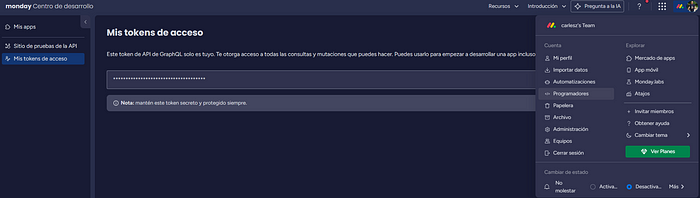
As always you need to get Access Tokens from Monday: Go to your profile, developers, Access Tokens, Generate it and keep it safe.
As a customer story to illustrate the integration:
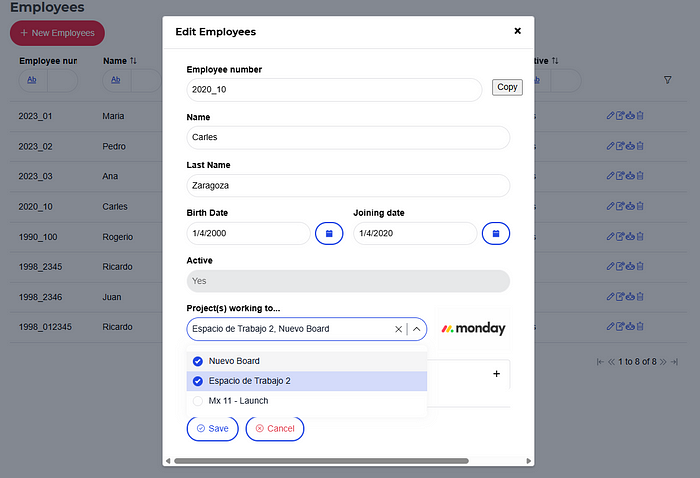
Our Mendix app manages employee data, and we would like to connect our employees to our Monday.com instance (project, board, task detail) to use these information for billing, holidays, and other Human Resources tasks.
So, our first task must be to fetch the Monday.com boards (Javascript example).
let query = '{ boards (limit:5) {name id} }';

fetch ("https://api.monday.com/v2", {
  method: 'post',
  headers: {
    'Content-Type': 'application/json',
    'Authorization' : 'YOUR_API_KEY_HERE'
   },
   body: JSON.stringify({
     'query' : query
   })
  })
   .then(res => res.json())
   .then(res => console.log(JSON.stringify(res, null, 2)));
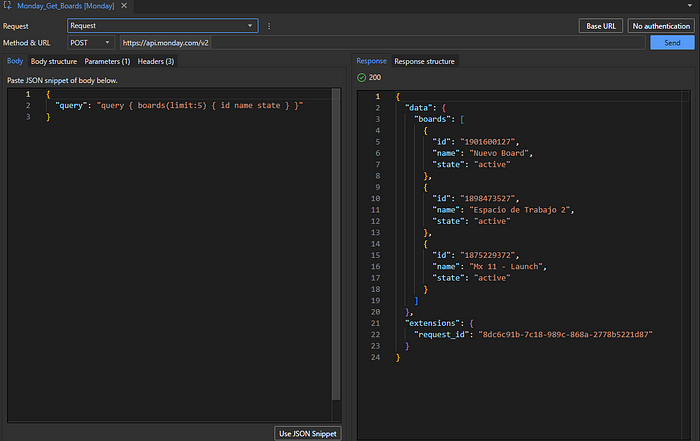
Have a quick look at the JS above and you’ll see how to set up the Mendix call. Using GraphQL everything is a POST. Then you need the body query, the content-type and your token and you will get the response:
{
  "data": {
    "boards": [
      {
        "id": "1901600127",
        "name": "Nuevo Board",
        "state": "active"
      },
      {
        "id": "1898473527",
        "name": "Espacio de Trabajo 2",
        "state": "active"
      },
      {
        "id": "1875229372",
        "name": "Mx 11 - Launch",
        "state": "active"
      }
    ]
  },
  "extensions": {
    "request_id": "90dbedd3-66cd-9e25-b322-29004f499a78"
  }
}
Then, you must create a new Mendix document type “Consumed Rest Service” filling the Body, Parameters (Token) and Headers and Mendix will generate the Response structure. Oh boy I love that!
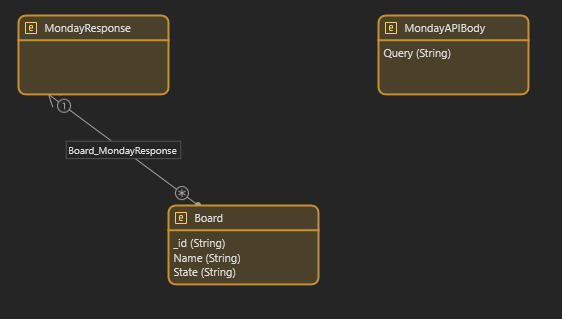
To make you domain model nice, you can rename the NPE entities:
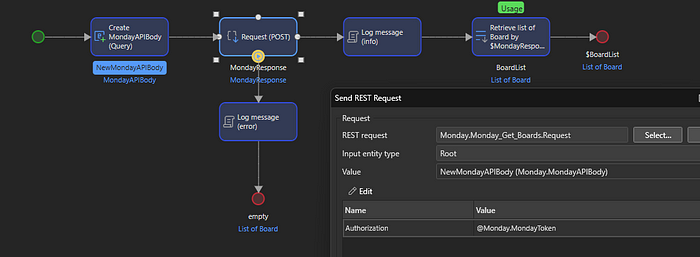
The final step is to build a microflow to set up the query and call the Monday.com API using your previous POST request using the Mendix Action — and you’re done!
Well, let’s drawn a Mendix page using the Monday.com API:
🤝 The Final Alliance
Once integrated, Mendix could pull data from Monday.com boards, visualize it, and even push updates.
Whether you’re building dashboards, syncing tasks, or trying to impress your boss with a “real-time planning tool,” this integration shows how Mendix + GraphQL + Monday.com = 💪
📚 Want to Read the Source Scroll?
Feel free to message me if you’d like a demo or guidance on implementing this combo yourself.
Thanks for reading — and may your APIs always return 200!
 Carles Zaragoza's Blog - Let's chat about Low-Code, IOT, BigData, ML & another IT trends